Last Updated: March 2026 |Reading Time: 8 mins | Category: China Apps Guide | Tags: maps apps in China for foreigners, Amap vs Baidu Maps, Google Maps alternative China, offline maps China, China navigation apps foreign phone
If you’re traveling to or living in China in 2026, you’ve probably already noticed a major issue: Google Maps doesn’t work reliably here. Even with a VPN, its data is outdated, GPS positioning is often inaccurate (off by hundreds of meters), and key features like real-time traffic, public transport routes, and local business information are missing or broken. This is no fault of Google—Chinese regulations restrict foreign mapping services from accessing up-to-date local data, making it nearly useless for navigating China’s cities, roads, and public transport.
But don’t worry: China has world-class local map apps that are far more accurate, feature-rich, and tailored to the country’s unique infrastructure—even for foreigners who don’t speak Chinese or have a Chinese phone number. In this 2026 guide, we break down the 5 best Google Maps alternatives for foreigners in China, including step-by-step setup guides, English support details, offline map tips, and which app is best for your specific needs (travel, driving, public transport, or small-town exploration).
We’ve tested all these apps firsthand in 2026—from Beijing’s busy hutongs to Shanghai’s high-speed rail stations, and even remote rural areas—to ensure they work seamlessly with foreign phone numbers, require no Chinese bank account, and solve the biggest navigation pain points for international visitors.
Table of Contents
- Why Google Maps Fails in China (2026 Reality)
- Option 1: Amap (Gaode Map) – Best Overall Google Maps Alternative
- Option 2: Baidu Maps – Most Accurate for Local Businesses & Small Alleys
- Option 3: Apple Maps – Best for iPhone Users (No Setup Needed)
- Option 4: Organic Maps – Best Free Offline Alternative (No Tracking)
- Option 5: MetroMan – Best for Subway Navigation (Major Cities)
- Amap vs. Baidu Maps: Which Is Better for Foreigners in 2026?
- Pro Tips for Using Map Apps in China (2026 Updated)
- FAQs: Map Apps in China for Foreigners
Why Google Maps Fails in China (2026 Reality)
Before we dive into the alternatives, it’s important to understand why Google Maps isn’t a viable option in China—even in 2026. The main reasons are:
- Outdated Data: Google Maps can’t access real-time Chinese mapping data due to regulatory restrictions. New roads, buildings, subway lines, and even entire neighborhoods are missing or mislabeled, making navigation risky—especially in rapidly developing cities like Shenzhen or Chengdu.
- Inaccurate GPS: Without access to local positioning services, Google Maps’ GPS accuracy is often off by 100–500 meters, leading you to the wrong street or building.
- Missing Key Features: Real-time traffic updates, bus/subway arrival times, bike-sharing locations, and local business hours—all critical for travelers—are either unavailable or outdated on Google Maps.
- VPN Dependency: Even basic functionality requires a VPN, which can be unreliable or slow in China, leading to frequent crashes or loading errors.
The good news? China’s local map apps fix all these issues—and in 2026, they’re easier than ever for foreigners to use, with no Chinese phone number or language skills required.
Option 1: Amap (Gaode Map) – Best Overall Google Maps Alternative
Amap (short for Gaode Map, 高德地图) is China’s most popular map app, with over 700 million users, and it’s our top pick for foreigners in 2026. Owned by Alibaba Group, it’s fully optimized for China’s road networks, public transport, and local services, with real-time traffic updates, accurate GPS, and a dedicated English version launched in 2025. Unlike Google Maps, Amap covers every corner of China—from major cities to remote rural areas—and works seamlessly with foreign phone numbers.
What makes Amap stand out for foreigners is its intuitive English interface, offline map support, and compatibility with international phones—no Chinese SIM card or bank account needed. It’s also the most reliable app for driving, with detailed speed camera alerts and congestion-avoiding routes, and its public transport features (including subway exit guidance) are second to none.
Step-by-Step Setup for Foreigners (No Chinese Phone Number)
- Download the App: Search for “Amap” (or “Gaode Map”) in the App Store (iOS) or Google Play (Android). For easier access, you can also download the international version “A Map Go”, which automatically defaults to English on first launch.
- Switch to English Mode (Critical): If you downloaded the standard Amap app (not A Map Go), follow these steps to switch to English:
- Open the app and tap the “Me” tab (profile icon in the bottom right corner, looks like a person).
- Scroll down and tap the Settings icon (⚙️, labeled “设置” in Chinese).
- Select “General” (通用设置) and then tap “Language” (语言).
- Choose “English” from the list—the app will refresh, and all menus, buttons, and instructions will switch to English.
- Register (Optional but Recommended): You can use Amap without registration, but registering lets you save favorites, offline maps, and recent searches. To register:
- Tap “Me” → “Log In” → “Register”.
- Select your country/region code (e.g., +1 for USA, +44 for UK) and enter your foreign phone number.
- Enter the 6-digit verification code sent to your phone (check spam messages if missing).
- Set a password (8–16 characters) and you’re done—no passport or Chinese ID required.
- Download Offline Maps: To use Amap without internet (critical for travel), tap “Explore” → “Offline Maps” → Select the regions you’ll visit (e.g., Beijing, Shanghai, Guangzhou) and tap “Download”. Offline maps include basic navigation, POIs (points of interest), and public transport routes.
Key Features for Foreigners (2026)
- Full English Interface: All menus, navigation instructions, and search results are available in English—no Chinese language skills needed.
- Real-Time Traffic & Navigation: Accurate traffic updates, congestion alerts, and AI-powered route planning to avoid delays. Works for driving, walking, cycling, and public transport.
- Public Transport Excellence: Detailed subway/bus routes, real-time arrival times, and clear subway exit guidance (critical in cities like Shanghai, where stations have 10+ exits).
- Offline Functionality: Download offline maps for any region in China—works without internet or phone signal.
- Local POIs: Search for restaurants, hotels, tourist attractions, ATMs, and convenience stores—with English descriptions and reviews (for popular spots).
- Ride-Hailing Integration: Book Didi rides directly from the app (no need to download a separate Didi app).
- AR Navigation: 2026 upgrade—augmented reality guidance for walking, making it easy to follow directions in busy areas (e.g., airport terminals, train stations).
Pros & Cons
- Pros: Full English support, no Chinese phone number needed, accurate everywhere (including rural areas), excellent public transport features, offline maps, ride-hailing integration.
- Cons: Some local business reviews are only in Chinese; occasional pop-up ads (easily closed).
Best For:
All foreigners—tourists, business travelers, and expats. Perfect for anyone who wants a one-stop navigation app that works seamlessly across China, with no language or setup barriers.
Option 2: Baidu Maps – Most Accurate for Local Businesses & Small Alleys
Baidu Maps (百度地图) is China’s second-most popular map app, and it’s the best choice if you want the most accurate local business data and coverage of small alleys, hutongs, and hidden gems. Owned by Baidu (China’s leading search engine), it’s known for its hyper-local accuracy—even finding tiny street food stalls or family-run shops that Amap might miss. While it doesn’t have a full English version (unlike Amap), it’s still easy for foreigners to use with a few simple hacks, and it now supports foreign phone numbers for registration.
Baidu Maps is particularly useful for travelers who want to explore off-the-beaten-path areas, as it has more detailed data for small towns and rural regions than most other apps. It also offers AR navigation and real-time public transport updates, making it a strong alternative to Amap.
Step-by-Step Setup for Foreigners (No Chinese Phone Number)
- Download the App: Search for “Baidu Maps” in the App Store (iOS) or Google Play (Android). Avoid third-party APKs—they may contain malware.
- Register with a Foreign Phone Number:
- Open the app and tap “注册” (Register) in the top right corner.
- Select your country/region code and enter your foreign phone number.
- Enter the 6-digit verification code sent to your phone.
- Skip the face scan (tap “取消” / Cancel) unless you plan to stay long-term—this is not required for basic navigation.
- You can also log in using Google or Facebook for faster access (tap “其他账号登录” → “Google” or “Facebook”).
- Work Around the Chinese Interface: Unlike Amap, Baidu Maps removed its full English mode in 2024 to focus on domestic users, but you can still use it easily with these tricks:
- Use Google Translate Camera: Open Google Translate, select “Camera” mode, and point it at the Baidu Maps interface to translate buttons (e.g., “搜索” = Search, “路线” = Route) in real time.
- Memorize Key Icons: Icons are intuitive—knife and fork = restaurants, bed = hotels, train = subway, car = driving. The blue dot represents your location (just like Google Maps).
- Search in Pinyin: Type the pinyin of landmarks (e.g., “Tiananmen” instead of 天安门) or addresses—Baidu Maps will recognize it and show results.
- Download Offline Maps: Tap the “我的” (Me) tab → “离线地图” (Offline Maps) → Select the regions you need and download. Offline maps work for basic navigation and POI searches.
Key Features for Foreigners (2026)
- Hyper-Local Accuracy: Covers small alleys, hutongs, and local businesses that Amap might miss—perfect for exploring traditional areas (e.g., Beijing’s hutongs, Xi’an’s Muslim Quarter).
- Real-Time Public Transport: Detailed subway/bus routes, arrival times, and transfer guidance—includes even small local bus lines.
- AR Navigation: Augmented reality walking directions, ideal for busy areas or confusing intersections.
- Merchant Reviews: The most comprehensive local business reviews (though most are in Chinese—use Google Translate to read them).
- Foreign Phone Number Support: Register and use all core features with a foreign phone number—no Chinese SIM required.
Pros & Cons
- Pros: Most accurate local data, supports foreign phone numbers, great for off-the-beaten-path exploration, detailed public transport info.
- Cons: No full English interface, requires basic workarounds (Google Translate, pinyin), some features (e.g., ride-hailing) need a Chinese phone number.
Best For:
Foreigners who want to explore local culture, eat at hidden restaurants, or navigate small towns and rural areas. Great for travelers who don’t mind using simple workarounds for the Chinese interface.
Option 3: Apple Maps – Best for iPhone Users (No Setup Needed)
If you’re an iPhone user, Apple Maps is the easiest Google Maps alternative in China—no setup, no new apps, and no Chinese language skills required. In 2026, Apple Maps uses Amap’s data for China, meaning it’s just as accurate as Amap for major cities, with real-time traffic, public transport routes, and POIs. The best part? It works without a VPN and has a fully English interface.
Apple Maps isn’t perfect—it lacks some of Amap’s advanced features (e.g., AR navigation, ride-hailing integration) and isn’t as accurate in rural areas—but it’s a great backup for iPhone users who want a hassle-free navigation experience.
How to Use Apple Maps in China (2026)
- Open Apple Maps: It’s pre-installed on all iPhones—no need to download anything.
- Enable Location Services: Go to your iPhone’s Settings → Privacy & Security → Location Services → Ensure Apple Maps is set to “While Using the App”.
- Search for Locations: Type in English (e.g., “Forbidden City Beijing”, “Shanghai Disneyland”) or pinyin—Apple Maps will show accurate results.
- Download Offline Maps (Optional): Tap the “i” icon next to a location → “Download Offline Map” to save maps for offline use (great for areas with poor internet).
Key Features for Foreigners (2026)
- No Setup Required: Pre-installed on iPhones, works out of the box with no registration.
- Fully English Interface: All menus, directions, and search results are in English.
- No VPN Needed: Works seamlessly in China without a VPN.
- Amap-Powered Data: Accurate for major cities, with real-time traffic and public transport.
- Siri Integration: Use voice commands (e.g., “Hey Siri, navigate to the Great Wall”) for hands-free navigation.
Pros & Cons
- Pros: No setup, fully English, no VPN, Amap-powered accuracy in major cities, Siri integration.
- Cons: Lacks advanced features (AR navigation, ride-hailing), less accurate in rural areas, no support for Android users.
Best For:
iPhone users who want a hassle-free, no-setup navigation option for major cities. Perfect as a backup to Amap or Baidu Maps.
Option 4: Organic Maps – Best Free Offline Alternative (No Tracking)
If you prefer aprivacy-focused, ad-free alternative to Google Maps, Organic Maps is a great choice. It’s an open-source, free app that offers offline maps for China (and the rest of the world) with no tracking, no ads, and no registration required. While it doesn’t have real-time traffic or public transport updates, it’s perfect for travelers who want a simple, reliable offline map for walking or driving.
Organic Maps uses OpenStreetMap data, which is updated by a global community of contributors. While it’s not as accurate as Amap or Baidu Maps for local businesses, it’s a solid backup for areas with no internet or for travelers who value privacy.
How to Use Organic Maps in China (2026)
- Download the App: Search for “Organic Maps” in the App Store (iOS) or Google Play (Android)—it’s free, no in-app purchases.
- Download China Offline Maps: Open the app → Tap the menu icon (☰) → “Download Maps” → Search for “China” → Select the regions you’ll visit (e.g., Beijing, Shanghai) and tap “Download”.
- Search for Locations: Type in English or pinyin—Organic Maps will show POIs, roads, and landmarks. It also supports coordinates if you have them.
Key Features for Foreigners (2026)
- 100% Free & Ad-Free: No ads, no tracking, no in-app purchases.
- Offline-First: Works completely offline—no internet or phone signal needed.
- Privacy-Focused: Doesn’t collect or share your location data.
- Open-Source: Regularly updated with community contributions.
Pros & Cons
- Pros: Free, ad-free, privacy-focused, fully offline, works on both iOS and Android.
- Cons: No real-time traffic or public transport updates, less accurate local business data, no English support for some Chinese POIs.
Best For:
Travelers who value privacy, need a reliable offline map, or want a free backup for areas with no internet. Not recommended as your primary map app, but great to have on hand.
Option 5: MetroMan – Best for Subway Navigation (Major Cities)
If you’re traveling to China’s major cities (Beijing, Shanghai, Guangzhou, Shenzhen) and plan to use the subway heavily, MetroMan (地铁通) is a must-have. It’s a dedicated subway navigation app that offers detailed subway maps, real-time arrival times, transfer guidance, and exit information—all in English (with partial Chinese support).
MetroMan is simpler than Amap or Baidu Maps, focusing solely on subway navigation, which makes it faster and easier to use for public transport. It works offline and supports foreign phone numbers for registration (though registration is optional).
How to Use MetroMan in China (2026)
- Download the App: Search for “MetroMan” (or “地铁通”) in the App Store (iOS) or Google Play (Android).
- Select Your City: Open the app and select the city you’re in (e.g., Beijing, Shanghai)—the subway map will load automatically.
- Plan Your Route: Tap “Route” → Enter your start and end stations (in English or pinyin) → MetroMan will show the fastest route, transfer stations, and estimated travel time.
- Download Offline Maps: Tap the menu icon → “Offline Maps” → Download the subway map for your city (works without internet).
Key Features for Foreigners (2026)
- Dedicated Subway Navigation: Focused solely on subway routes, arrival times, and exits—no extra clutter.
- English Support: Menus and route instructions are in English; station names are in both English and Chinese.
- Real-Time Arrival Times: Accurate updates for subway trains, so you know exactly when to expect your train.
- Exit Guidance: Tells you which subway exit to take to reach your destination (critical in large stations).
- Offline Support: Download subway maps for offline use—no internet needed.
Pros & Cons
- Pros: Simple, fast, dedicated to subway navigation, English support, offline maps, real-time arrival times.
- Cons: Only for subways (no driving/walking directions), limited to major cities, no support for buses or other public transport.
Best For:
Travelers who rely heavily on the subway in major Chinese cities. Perfect as a complement to Amap or Baidu Maps (use MetroMan for subways, Amap/Baidu for other navigation).
Amap vs. Baidu Maps: Which Is Better for Foreigners in 2026?
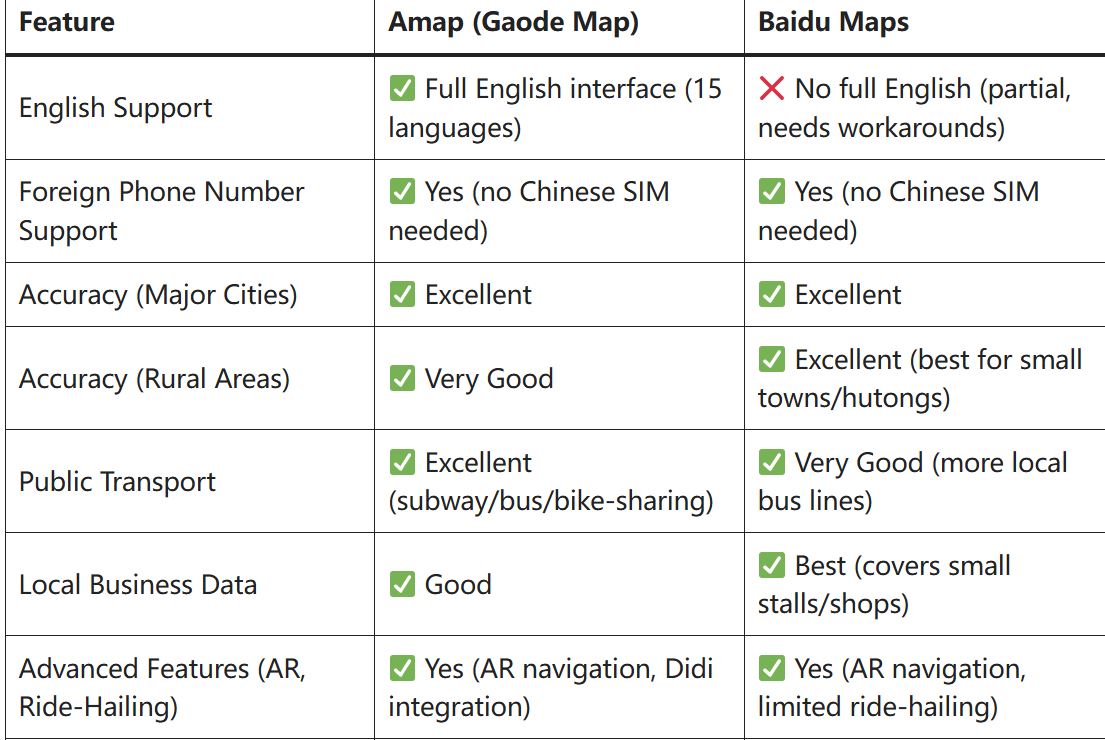
Amap and Baidu Maps are the two best options for foreigners in China, but they cater to different needs. Here’s a side-by-side comparison to help you choose:
| Feature | Amap (Gaode Map) | Baidu Maps |
|---|---|---|
| English Support | ✅ Full English interface (15 languages) | ❌ No full English (partial, needs workarounds) |
| Foreign Phone Number Support | ✅ Yes (no Chinese SIM needed) | ✅ Yes (no Chinese SIM needed) |
| Accuracy (Major Cities) | ✅ Excellent | ✅ Excellent |
| Accuracy (Rural Areas) | ✅ Very Good | ✅ Excellent (best for small towns/hutongs) |
| Public Transport | ✅ Excellent (subway/bus/bike-sharing) | ✅ Very Good (more local bus lines) |
| Local Business Data | ✅ Good | ✅ Best (covers small stalls/shops) |
| Advanced Features (AR, Ride-Hailing) | ✅ Yes (AR navigation, Didi integration) | ✅ Yes (AR navigation, limited ride-hailing) |
| Ease of Use for Foreigners | ✅ Very Easy (no workarounds) | ⚠️ Moderate (needs Google Translate/pinyin) |
Final Verdict: Choose Amap if you want a hassle-free, fully English experience with all features (best for most foreigners). Choose Baidu Maps if you want the most accurate local data and plan to explore off-the-beaten-path areas (and don’t mind simple workarounds).
Pro Tips for Using Map Apps in China (2026 Updated)
- Download Offline Maps Before You Go: Internet can be spotty in rural areas or on high-speed trains—download offline maps for all regions you’ll visit to avoid getting lost.
- Save Key Locations in English: Before your trip, save hotels, attractions, and restaurants in your map app (e.g., “InterContinental Beijing”, “Great Wall Mutianyu”) to avoid typing them later.
- Use Pinyin for Search: If an English search doesn’t work (e.g., for small local spots), type the pinyin of the location—all map apps recognize pinyin.
- Enable Precise Location: Go to your phone’s settings and enable “Precise Location” for your map app—this ensures accurate GPS positioning, even in dense cities.
- Carry a Physical Map as Backup: For remote rural areas, offline digital maps may not be perfect—carry a small physical map of the region (available at hotels or tourist centers).
- Avoid Fake Map Apps: Only download apps from the App Store or Google Play—fake map apps target foreigners and may steal your location data or install malware.
FAQs: Map Apps in China for Foreigners
1. Do I need a Chinese phone number to use these map apps?
No! All the apps listed above (Amap, Baidu Maps, Apple Maps, Organic Maps, MetroMan) work without a Chinese phone number. Amap and Baidu Maps allow registration with foreign phone numbers (optional but recommended), while Apple Maps, Organic Maps, and MetroMan require no registration at all.
2. Can I use these apps without a VPN?
Yes! All the apps listed work without a VPN. Amap, Baidu Maps, MetroMan, and Organic Maps are local Chinese apps that don’t require a VPN. Apple Maps also works without a VPN in China (unlike Google Maps).
3. Which app is best for driving in China?
Amap is the best app for driving—it has real-time traffic updates, speed camera alerts, congestion-avoiding routes, and detailed road information. Baidu Maps is also good, but Amap’s driving features are more user-friendly for foreigners.
4. Are these apps accurate in rural areas?
Baidu Maps is the most accurate in rural areas and small towns, followed by Amap. Apple Maps and Organic Maps are less accurate in rural areas but still usable for basic navigation. For remote areas, we recommend downloading offline maps and carrying a physical map as backup.
5. Can I use these apps to find tourist attractions?
Yes! All the apps list major tourist attractions with English names, addresses, and (for Amap/Baidu) reviews. Amap and Baidu Maps also offer directions to attractions, including public transport routes and parking information.
Wrapping Up: Best Map Apps in China for Foreigners 2026
Forget Google Maps in China—2026’s best map apps are local, accurate, and foreigner-friendly. For most travelers, Amap is the top choice, with its full English interface, no Chinese phone number requirement, and all-in-one navigation features. If you want to explore local culture and hidden gems, Baidu Maps is worth the simple workarounds.
iPhone users can rely on Apple Maps for hassle-free navigation, while Organic Maps is perfect for privacy-focused travelers. For subway-heavy trips,MetroMan is a must-have complement to your primary map app.
With these apps, you’ll navigate China’s cities, roads, and public transport like a local—no language skills, no Chinese phone number, and no VPN required. Remember to download offline maps before your trip, save key locations, and use pinyin for tricky searches, and you’ll have a smooth navigation experience across China.